How it works

How Direct Debit works

Extero is an official GoCardless partner. You connect your own account. Regulars pay you by Direct Debit. The money goes to your bank on GoCardless’s timetable. We never hold it.

Connect your account

In the app go to Settings, then Payments. Choose Connect GoCardless if you already have an account, or Create account if you do not. Approve it when GoCardless asks.

When it is connected you will see that you are ready to collect, or pending if they are still checking you. Direct Debit is on every plan, including Core.

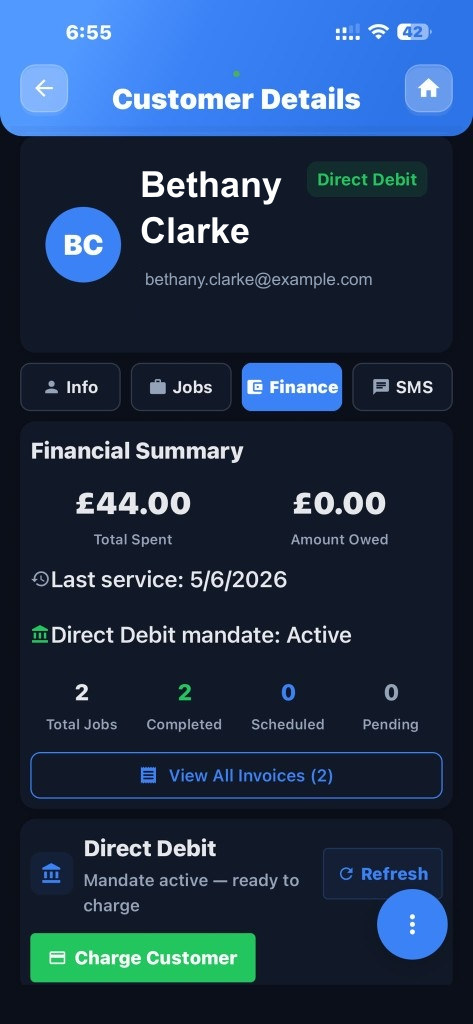
A customer with Direct Debit set up

Get a customer set up

Open the customer and send them the setup link by text or email. They enter their bank details on GoCardless’s own pages, so you never see the sort code.

GoCardless calls this a mandate — it just means they have agreed you can take payments. When they have finished, that customer is ready to charge.

Invoices on the phone

Take the payment

You can take it when you mark a stop done on the round, or from the customer. The invoice updates when GoCardless says the payment went through or failed. Money usually reaches your bank a few working days later.

If someone wants to pay an invoice with a card instead, connect Stripe from the same Payments screen. They tap Pay Now on the invoice. That money goes to your Stripe account, then your bank.

A customer ready to charge on the computer

What it costs

The customer pays the amount you charged. Fees come out of the payout to you. They do not see an extra line on their statement.

On Direct Debit, GoCardless usually takes 1% + 20p (capped at £4), and Extero takes 0.5%. On a £50 clean that is about 70p to GoCardless and 25p to Extero. You see a smaller payout in GoCardless, not a second bill from us.

On a card payment, Stripe’s usual fee is about 1.5% + 20p — about 95p on £50.

You can disconnect from Settings, then Payments, at any time. Payments stop. The customer’s Direct Debit stays on your GoCardless account, so if you connect again you pick up where you left off. Refunds and extra GoCardless settings stay in the GoCardless dashboard.

What the customer gets after a job

Money in the app